
| Brand / Skin | Settings Path to Enable APK Installation |
|---|---|
| Samsung (One UI) | Settings > Apps > Chrome/Files > Install Unknown Apps > Toggle On |
| Xiaomi / POCO (MIUI / HyperOS) | Settings > Privacy Protection > Special Permissions > Install Unknown Apps > Chrome > Allow |
| Realme / Oppo (ColorOS) | Settings > Security > Unknown Source Installations > Select Browser > Allow |
| Vivo (FuntouchOS) | Settings > Security & Privacy > Install Unknown Source Apps > Enable for Browser |
ধাপে ধাপে ইনস্টলেশন করার নিয়ম Step-by-Step Installation Tutorial
যেকোনো ফোনে ইনস্টল করার সাধারণ নিয়ম:
- ফাইল ডাউনলোড: topcrickex.com থেকে Download APK বাটনে চাপুন।
- ফাইলটি খুলুন: ডাউনলোড শেষে নোটিফিকেশন বার থেকে অথবা ফোনের Downloads ফোল্ডারে গিয়ে ফাইলটিতে ট্যাপ করুন।
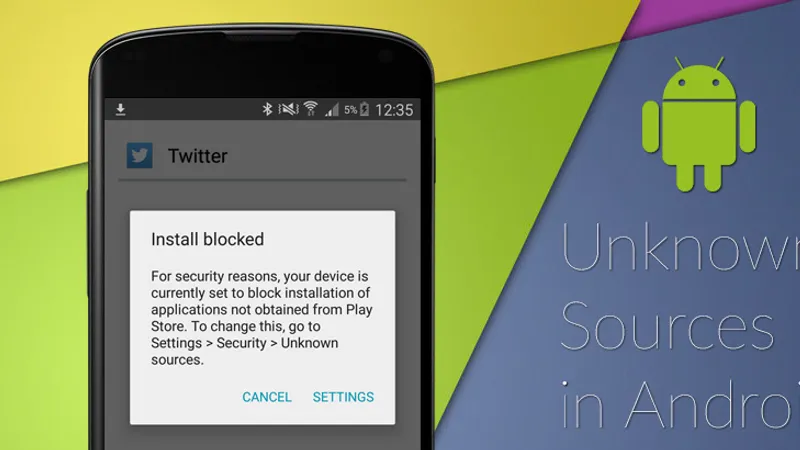
- অনুমতি দিন: স্ক্রিনে যদি "Install unknown apps" সংক্রান্ত মেসেজ আসে, তবে Settings-এ ক্লিক করে Allow from this source অপশনটি অন (চালু) করে দিন।
- Install বাটনে চাপুন: স্ক্রিনে আসা Install বাটনে চাপুন। ৫-১০ সেকেন্ডের মধ্যে ইনস্টলেশন শেষ হয়ে যাবে এবং আপনি Open চেপে সরাসরি অ্যাপ চালু করতে পারবেন।
Follow these universal steps to install the APK:
- Download the File: Tap Download APK on topcrickex.com.
- Open the Package: Once completed, tap the notification in your notification tray or open your phone's Downloads folder.
- Allow Installation: If prompted with "For your security, your phone is not allowed to install unknown apps from this source", tap Settings on the prompt, toggle Allow from this source to ON, and tap your back button.
- Tap Install: Select Install on the confirmation screen. Within 10 seconds, the app is ready. Tap Open to begin.
অ্যান্ড্রয়েড ১২/১৩/১৪ ফোনে "App Not Installed" ও পার্স এরর সমাধানের উপায় Resolving "App Not Installed" and "Parse Error" on Android 12/13/14
লেটেস্ট অ্যান্ড্রয়েড ডিভাইসে ইনস্টল করার সময় কোনো সমস্যা দেখা দিলে নিচের সমাধানগুলো অনুসরণ করুন:
- "Parse Error" সমাধান: ইন্টারনেট সংযোগে সাময়িক ব্যাঘাতের কারণে ডাউনলোড ফাইল অসম্পূর্ণ হলে এই মেসেজ দেখায়। ডাউনলোড ফোল্ডার থেকে ফাইলটি ডিলিট করে পুনরায় ফ্রেশ ডাউনলোড করুন।
- "App Not Installed" সমাধান: ফোনে অন্তত ১৫০ মেগাবাইট ইন্টারনাল স্টোরেজ খালি রাখুন। আগে কোনো থার্ড-পার্টি সাইট থেকে অ্যাপ ইনস্টল করা থাকলে তা প্রথমে আনইনস্টল করে নিন।
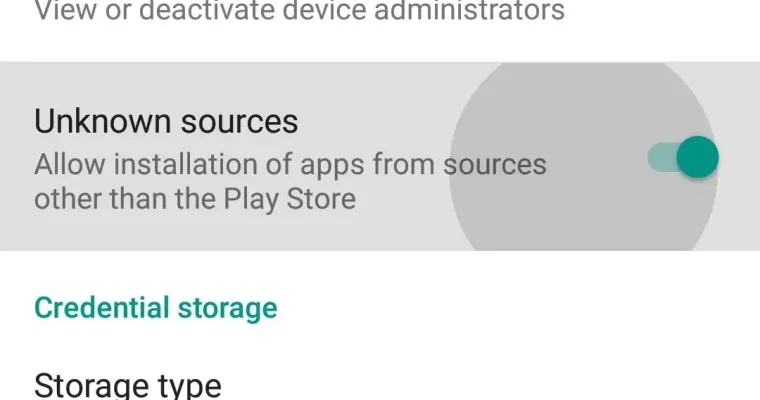
- "Install Unknown Apps" পারমিশন চালু করা: ফোনের Settings > Apps > Special App Access > Install Unknown Apps-এ গিয়ে ক্রোম (Chrome) বা ফাইল ম্যানেজারের জন্য পারমিশন অন করে দিন।
If you encounter an installation failure on modern Android systems, use these verified troubleshooting steps:
- Fixing "Parse Error (There was a problem parsing the package)": This indicates an incomplete download caused by a transient network drop. Delete the damaged APK file from your Downloads folder, clear browser cache, and re-download.
- Fixing "App Not Installed": Ensure your phone has at least 150 MB of free internal storage. If an older Crickex package was previously installed from an untrusted source, uninstall it completely before installing the official topcrickex.com package.
- Granting Chrome / File Manager Permissions: Go to Settings > Apps > Special App Access > Install Unknown Apps, select Chrome (or your File Manager), and toggle Allow from this source to ON.
সাধারণ জিজ্ঞাসা ও উত্তর (FAQ) Frequently Asked Questions (FAQ)
ফোনের স্টোরেজ মেমোরি খালি না থাকলে বা পূর্বে ইনস্টল করা কোনো পুরনো ফাইল কনফ্লিক্ট করলে এই মেসেজ আসতে পারে। ফোনের স্টোরেজ একটু খালি করে পুরনো ফাইল মুছে নতুন করে চেষ্টা করুন।
This typically occurs if your device has insufficient free storage (ensure at least 200MB free) or if an incompatible older build was already partially installed. Uninstall any previous build, reboot your phone, and reinstall.
পপ-আপ আসলে "Settings"-এ ক্লিক করে "Allow from this source" অপশনটি অন করুন এবং ব্যাক বাটনে চাপ দিয়ে ইনস্টল প্রক্রিয়াটি সম্পূর্ণ করুন।
When prompted with "Chrome does not have permission to install apps", tap Settings directly on the pop-up, toggle "Allow from this source", and press the Back button to resume installation immediately.
প্লে স্টোরের বাইরের যেকোনো আসল ফাইল ফোনে নিতে অ্যান্ড্রয়েড এই অনুমতি চায়, যা অন করলেই ইনস্টল শুরু হয়।
Google restricts direct downloads outside Google Play by default; enabling this setting permits safe sideloading of verified packages.
ফোনের কোনো নাইট মোড বা স্ক্রিন ডিমার অ্যাপ চালু থাকলে তা বন্ধ করুন, কারণ এগুলো স্ক্রিন ট্যাপ ব্লক করে রাখে।
Ensure you do not have any blue-light filter or screen dimmer apps running in the background, as Android blocks taps over active screen overlays.
হ্যাঁ। একবার ইনস্টল হয়ে গেলে ফোনের স্টোরেজ খালি রাখতে ডাউনলোড ফোল্ডারের ফাইলটি নিশ্চিন্তে ডিলিট করে দেওয়া যায়।
Yes. Once installed, you can safely delete the 32 MB `.apk` file from your Downloads folder to free up internal storage.